
NowTunes – A Desktop Now Playing Widget Application


I know that AI get’s a lot of stick these days and rightly so in some cases, but I have made something using it that I consider to be really cool and genuinely useful.
I’ve always loved having a nice looking mini-player on my desktop that displays album art for the music app I’m using and have been impressed how KDE Plasma has a the media player widget that can do this for anything that’s playing, even if it’s streaming Spotify or Soundcloud in a browser.
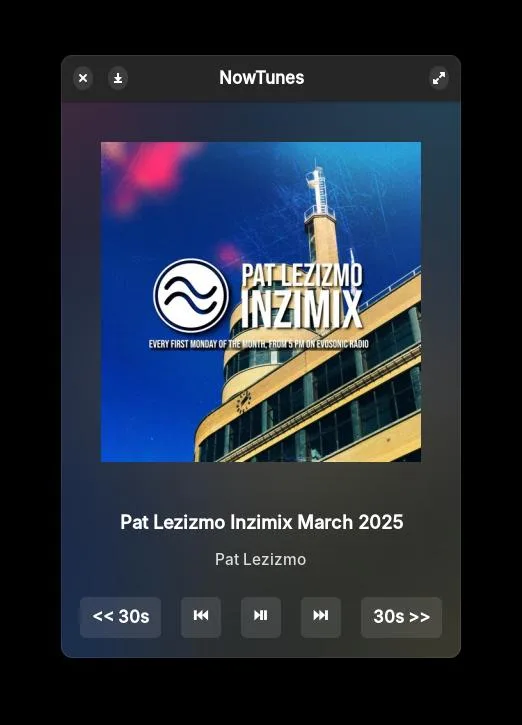
As I sometimes use elementary OS and GNOME, I’ve missed having a cool looking desktop widget in these environments that display my Now Playing tunes and it’s artwork. Even though I can install Soundcloud, Mixcloud and Spotify as web apps to my system, they do not come with mini-players or don’t respond nicely enough in the browser window to look aesthetic on the desktop.
As I know ZERO about proper programming languages and have no real desire to learn, I wondered if ChatGPT could be useful enough to build me an application to do this and lo and behold it has been.
By telling the AI about what I want and how I want it to look, along with the CSS knowledge I have, I now have installed on my elementary OS system, a fully working application widget that looks cool and does exactly what I want it to.
I’ve called the app NowTunes and it’s a minimalist desktop “Now Playing” widget for Linux, built with Python, GTK4 and libadwaita, designed to show what’s currently playing in your media player using the MPRIS (Media Player Remote Interfacing Specification) interface.
It features:
- 🎵 Live Track Info: Displays the current track title and artist from any MPRIS compatible player (e.g., Lolllypop, Spotify, as well as Soundcloud/Mixcloud in a web browser).
- 🖼️ Album Art Display: Shows album artwork, and uses a blurred version as the app background for aesthetic appeal.
- ⏯️ Playback Controls: Includes buttons to play/pause, skip tracks, and jump forward/backward 30 seconds.
- 🖼️ Responsive Layout: A clean, centred design that adapts to different window sizes.
- 🌗 Dark Theme Styling: Styled with custom CSS for a sleek, dark appearance that integrates well with modern desktops.
- 🪟 Native App Feel: Launches as a stand-alone GTK app with its own icon and .desktop launcher, appearing in elementary OS Wingpanel and application search.
It runs quietly in the background and updates every second, making it a lightweight yet elegant media companion for my Linux desktop.
I’m really impressed with the result and how powerful AI can be although it did take about six hours or so working with it to get it how I wanted it and there were several times it went went round in circles by reintroducing regressions when updating the code, so I can see why proper programmers are still scoffing at using AI as a serious tool.
It’s been a really good introduction to using AI for programming rather than just text and image generation and also getting to work with Python and seeing what the code does. Who knows? Maybe one day I’ll bother to learn it properly but for now though, I’m content with how this little project has turned out and my new found status as a Vibe Coder.
Whilst I’ve created this little app for my own use case, if this app is of interest to you and there’s enough people wanting it too, then maybe the next thing to do is to get ChatGPT to teach me how to package it up and release it as a Flatpak.